Have you always wanted to get a new phone case for your phone and/or personal electronic device, and do not know where to get one from? Welcome to Shop Amazing, where we have rounded up most of the best phone accessories and electronics. And shopping with us is as easy as A, B, C.
To start, you will just go to shopamazing.co.ke on your browser of choice. You will be welcomed with our homepage, as shown in the picture below.
There are two ways to search for what you are looking for, and we have made them easier for you. The first way is by exploring our menu and navigating all the way to the exact product that you are interested in. For example, let’s say you want a phone cover for the iPhone 16 Pro Max and you do not know exactly what you want.
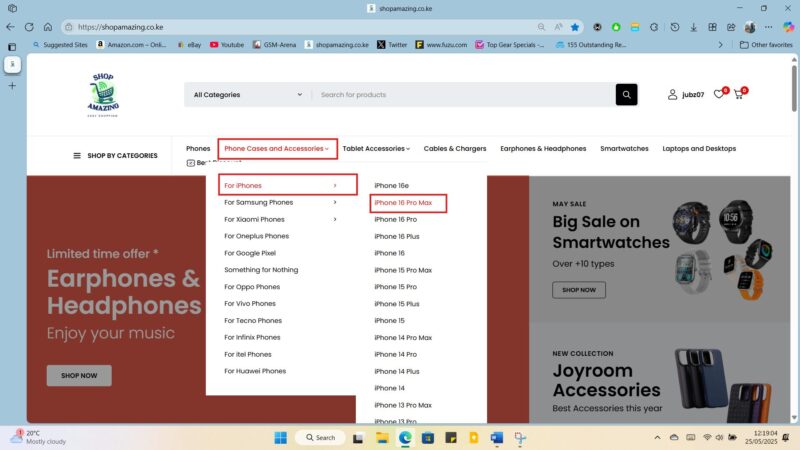
Navigate to Phone Cases and Accessories on the menu tab.
If using a computer, hover your mouse above the Phone Cases and Accessories for a drop-down to appear. If using a phone, touch the down arrow button for the drop-down to appear and navigate to the iPhone 16 Pro Max.
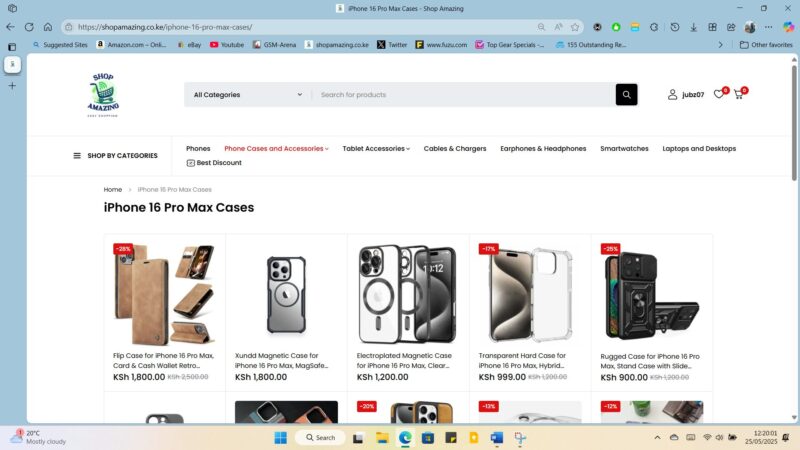
You will see all phone cases and accessories (camera lens protectors and screen protectors) that we have.
From there, choose exactly what you are interested in and enter the page
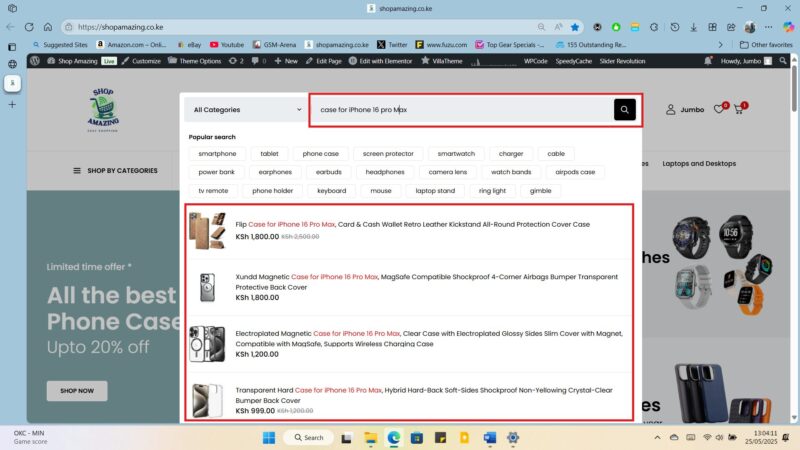
The second method is through the search method. This method is for the people who know exactly what they want and they can just search for it from the search bar on the top par of every page on our website. For example, you can search ‘Case for iPhone 16 Pro Max’ to bring results for cases for iPhone for 16 Pro Max or ‘Flip Case for iPhone 16 Pro Max’ to bring the exact product.
5. On the product page it’s important to read all the details of the product. That is, the product name, short description, the long description and also the package information of the product. They all contain vital information of the product.
6. Once you are happy which your choice, you can select the ‘buy now’ button, or ‘add to cart’ button if you want to continue shopping for something else and pay for the consolidated package together. If an item has an option, either colour, size or amount option, you will need to select the option that you want first before pressing ‘buy now’ or ‘add to cart’ button.
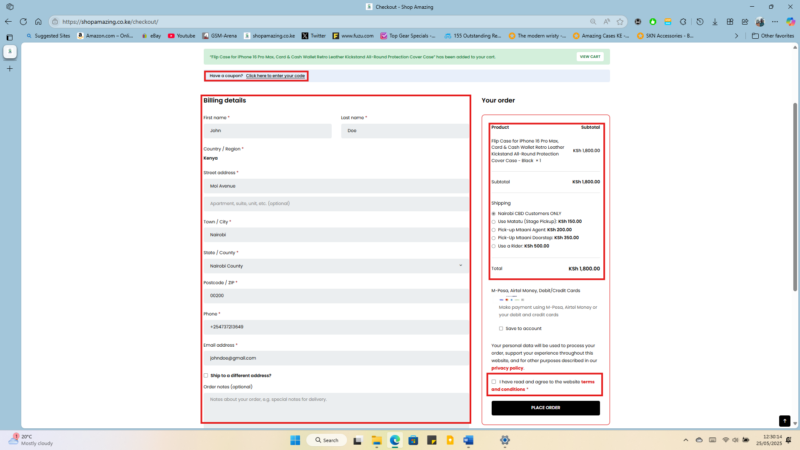
7. The next step after pressing the buy now button will be the checkout page, where you will confirm what you have chosen and see the amount. Still on this page, you will have to fill in your billing details since this information is what will help us be able to get the details for the delivery of your product. Add a coupon code if you have received one from us. Once satisfied that you have provided the right information, you will have to accept our privacy policy and terms and conditions before clicking the ‘place order’ button. You can choose to open an account if you so wish on this page.
8. You will the be redirected to the payment page where you will input your mode of payment, M-Pesa, Airtel Money or Pay with Bank Debit/Credit Card. For those using M-Pesa or Airtel money, a pop up will come to your phone to put in your pin code for your preferred payment method and an order will be executed.
9. You will be redirected to the ‘order successful’ page, and an email will be sent to your provided email address with a confirmation of the order and receipt of the order.
10. Now all you will have to do is wait for a call from us to confirm your order and let you know of the courier that we will choose for the delivery of your product.
It is also important to read our terms on the shipping and refund page to know how long shipping will take and, in case of any defective product, how to get a refund of the product.
We all love clear cases because they showcase the beauty of our phones. For this reason, most people have two or more phone cases, one of which is a clear case or has a clear back cover so that they can always be reminded of the beauty of what their hard-earned money got them.
But why do they turn yellow/Brown?
Ah, the age-old mystery of the yellowing clear phone case! It’s a common frustration, and while it might seem like your once pristine case is simply aging poorly, there’s some interesting science at play.
The primary culprit behind this discoloration is a process called oxidation. Many clear phone cases are made from a type of plastic called thermoplastic polyurethane (TPU). This material is popular because it’s flexible, durable, and relatively inexpensive. However, TPU contains polymer chains that react with ultraviolet (UV) light from the sun and even artificial light. This exposure initiates a chemical reaction where the material begins to break down at a molecular level.
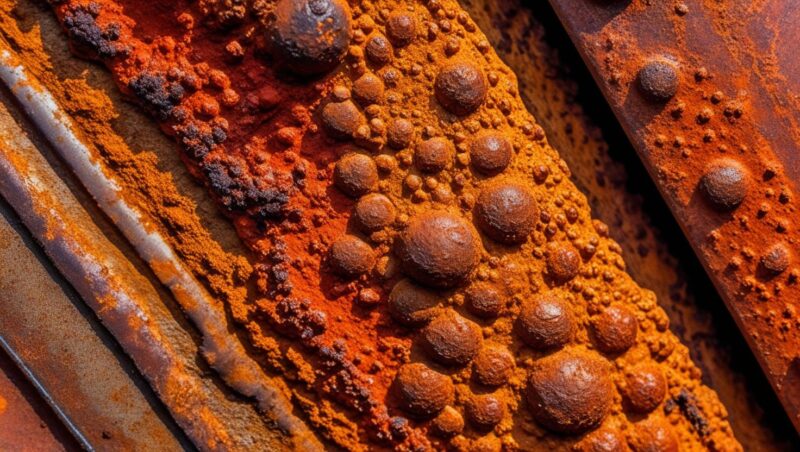
Think of it like this: just as oxygen can cause metal to rust, it can also cause TPU to undergo a chemical change. This change results in the formation of new molecules that absorb light differently, giving the case that characteristic yellow hue.
A Piece of metal having undergone oxidation.
Another contributing factor is the oils from your skin and the environment. Every time you hold your phone, natural oils and sweat transfer to the case. Dust and other tiny particles in the air also accumulate on the surface. Over time, these substances can become embedded in the TPU and, through further chemical reactions or simply by staining, contribute to the yellowing effect.
Heat can also accelerate this process. Leaving your phone in direct sunlight or in a hot car can speed up the oxidation of the TPU, making the yellowing appear more quickly and intensely.
While some manufacturers are exploring materials and coatings to mitigate this issue, the fundamental chemical properties of TPU make it susceptible to yellowing over time. So, while that clear case looked fantastic when you first got it, the eventual yellowing is often an unavoidable consequence of the material’s interaction with light, heat, and the environment.
How do you slow down your clear phone case from turning yellow?
There are many ways to prevent your phone from turning yellow. They start with preventing exposure of your phone case to the above-mentioned factors that make your phone turn yellow, and end with using a completely different material for your phone case.
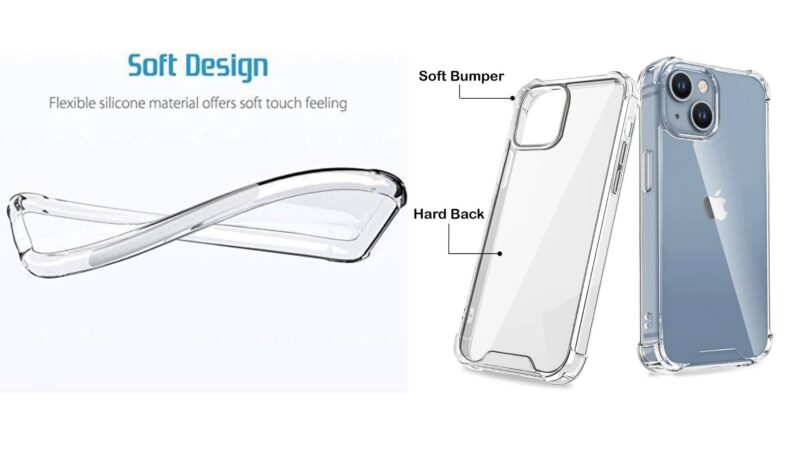
A photo showing a TPU transparent phone case (left) vs a Polycarbonate (PC) transparent phone case (right).
Ways in which to slowing down yellowing are:
With clear cases, it is important to prevent them from being exposed to too much UV light, that is, sunlight, fluorescent lamps, and LED lights, by covering them with an opaque material or putting them in pockets if you are out. It is also important to use clean hands to prevent the case from being exposed to oils and dirt. Using your phone in a cool, dry place will also definitely help slow down yellowing.
It is also important to note that all TPU cases will turn yellow after a while, and the above methods only slow down yellowing. One good way to substantially slow down yellowing is by buying a phone case made of transparent PC material (Polycarbonate) or Acrylic (Hard Clear Cases). PC or acrylic case have strong bonds in them which slow down the chemical reaction that would make them to oxidate faster. These clear cases are, however expensive than their TPU counterparts.
It is important to note that most clear cases turn yellow eventually. In recent times, some manufacturers have made phone cases with clear covers that have been promised not to turn yellow in their entirety for their lifetime, but we are yet to confirm this.
Yess!! Maina’s mshande imeingia and he has been waiting for this money for AGES so that he can finally buy a new phone. His last phone, his dear iPhone 11 Pro Max, was grabbed out of his hand by one of the string of organized criminals on boda-bodas, who have been terrorizing our major cities, but by good luck, they didn’t have a good grip and his phone fell screen first. But wait! His screen cracked. Ooooh nooooo!
It first started off with a small line of crack on his screen, which quickly propagated to a black fluid-like damage spreading from the line of crack outwards, then to the whole left side of his screen not working. Since then, he has been out and about mending his phone’s display. Every time he puts a new display, it just stops responding to touches or it glitches and the most recent repair, the colours are just off and his screen has ghost touches, almost like someone else is using his phone remotely. His friends have been laughing and mocking him for having a bad phone. Some have even started ignoring his calls, and he’s tired. He decides it’s time to restore his pride!
Now. Yes. NOW! He finally got some money to get himself the new iPhone 16 Pro Max, and he needs a new phone case and a screen protector to finally safeguard his phone from cracking again. He has just bought his phone cover and screen protector from Shop Amazing na order imefika. Putting on the phone case is direct, but ooooh, he has never applied a screen protector before. Let us teach Maina and you how to.
How to apply a screen protector
Applying a screen protector can seem tricky, but if you take your time and follow these steps, you can get a bubble-free finish. Here’s a comprehensive guide:
Preparation is Key
Find a clean workspace: Choose a well-lit area with minimal dust. Some people even suggest doing this in a steamy bathroom (after the steam has settled) as the humidity can help reduce airborne dust.
Gather your supplies: You’ll need the screen protector, any included cleaning wipes (wet and dry), a dust removal sticker (if provided), and a squeegee or a credit card wrapped in a microfiber cloth (if provided).
Wash your hands: This prevents transferring oils and dirt to your phone screen.
Clean Your Phone’s Screen Thoroughly:
Remove any existing case or screen protector.
Use the wet wipe: Carefully clean your phone’s screen to remove fingerprints, smudges, and any debris.
Dry the screen: Use the dry wipe to ensure the screen is completely dry. Any moisture left behind can cause issues with adhesion.
Remove any remaining dust: This is crucial! Use the dust removal sticker (if included) by gently dabbing it across the screen. Inspect the screen at an angle under a light to catch any lingering dust particles.
Align the Screen Protector:
Peel off the protective layer: This is usually the layer protecting the adhesive side. Be careful not to touch the adhesive side of the screen protector.
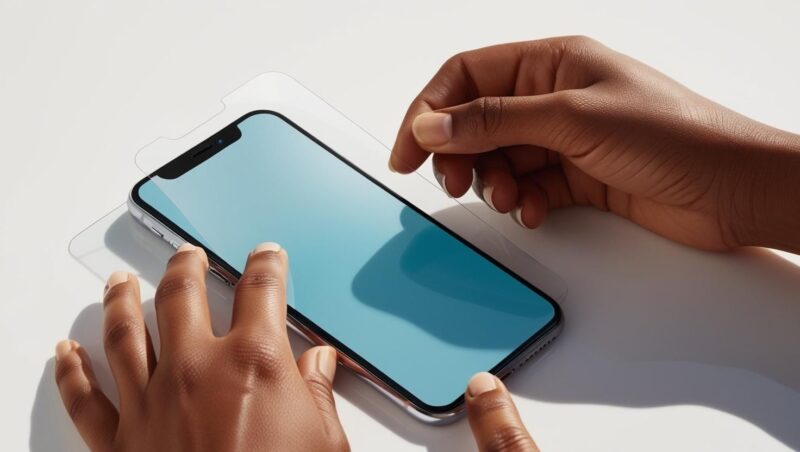
Position the protector: Carefully align the screen protector with your phone’s screen, paying attention to cutouts for the camera, speaker, and buttons. Some protectors come with guide stickers that you can use to create a hinge on one side, making alignment easier.
Double-check the alignment: Before applying, make sure the protector is perfectly aligned. Once it sticks, it’s difficult to reposition.
Apply the Screen Protector:
Gently place it down: Once aligned, slowly lower the screen protector onto your phone’s screen.
Press down: Gently press down on the center of the screen protector. The adhesive should start to spread across the screen.
Remove air bubbles: If you see any air bubbles, use the squeegee or a credit card wrapped in a microfiber cloth to push them towards the edges of the screen. Apply gentle, even pressure. Small bubbles may disappear on their own over time.
Final Touches:
Wipe the screen: Use the microfiber cloth to gently wipe the screen protector and remove any fingerprints or smudges.
Check for any remaining bubbles: If there are still stubborn bubbles, try gently pushing them towards the edges again.
Tips for a Perfect Application:
Take your time: Rushing the process increases the chances of mistakes and bubbles.
Work in a well-lit area: This helps you see dust and align the protector accurately.
Consider using the hinge method: This provides more control during application.
Don’t panic about small bubbles: Most will disappear within a day or two.
If you get dust under the protector: Gently lift the protector near the dust particle using a piece of tape and use another piece of tape to lift the dust off the screen or the protector’s adhesive side before reapplying.
By following these steps carefully, you should be able to apply your screen protector smoothly and effectively, keeping your phone’s screen protected from scratches and minor damage.